
How to Safely Store Electronics in a Storage Unit
Protect your TV, laptop, and gaming gear from moisture, heat, and dust. Learn how to safely store electronics in a storage unit with pro packing and climate-control tips.

By Brandon Hall
Your flat-screen TV, gaming console, laptop, and smart home devices represent a significant investment. When you need to clear space during a move, renovation, or downsizing phase, a storage unit can seem like the obvious solution. However, electronics are sensitive to temperature swings, humidity, dust, and physical impact. A poorly packed storage unit can turn your valuable gear into a pile of corroded, cracked, or dead devices. This guide walks you through exactly how to safely store electronics in a storage unit, from preparation and packing to choosing the right facility and arranging items inside.
Before you even reserve a unit, understand that electronics require more care than boxes of books or off-season clothing. The enemies are moisture, heat, cold, static electricity, and pests. If you are still deciding whether you need a unit at all, our guide on when to rent a storage unit during a home move can help you weigh the timing and alternatives. Once you commit to storage, follow the steps below to protect your devices.
Prepare Electronics Before Packing
Preparation is the most overlooked phase, yet it determines whether your electronics survive months in storage. Start by backing up all data on computers, phones, and tablets. Remove batteries from remotes, controllers, and small devices. Batteries can leak corrosive acid over time, ruining circuit boards and contacts. For devices with built-in batteries, charge them to about fifty percent, then power them down completely. A full charge or a completely dead battery can both shorten battery life during long storage.
Clean each item with a dry, lint-free cloth or a can of compressed air. Dust mixed with moisture becomes a conductive paste that can short circuits. Take photos of all cable connections before you unplug anything. Label every cable with a piece of masking tape and a marker. Use twist ties or velcro straps to keep cords neat. Place small parts like screws, memory cards, and adapters in labeled zip-top bags, then tape those bags to the main device or pack them in the same box.
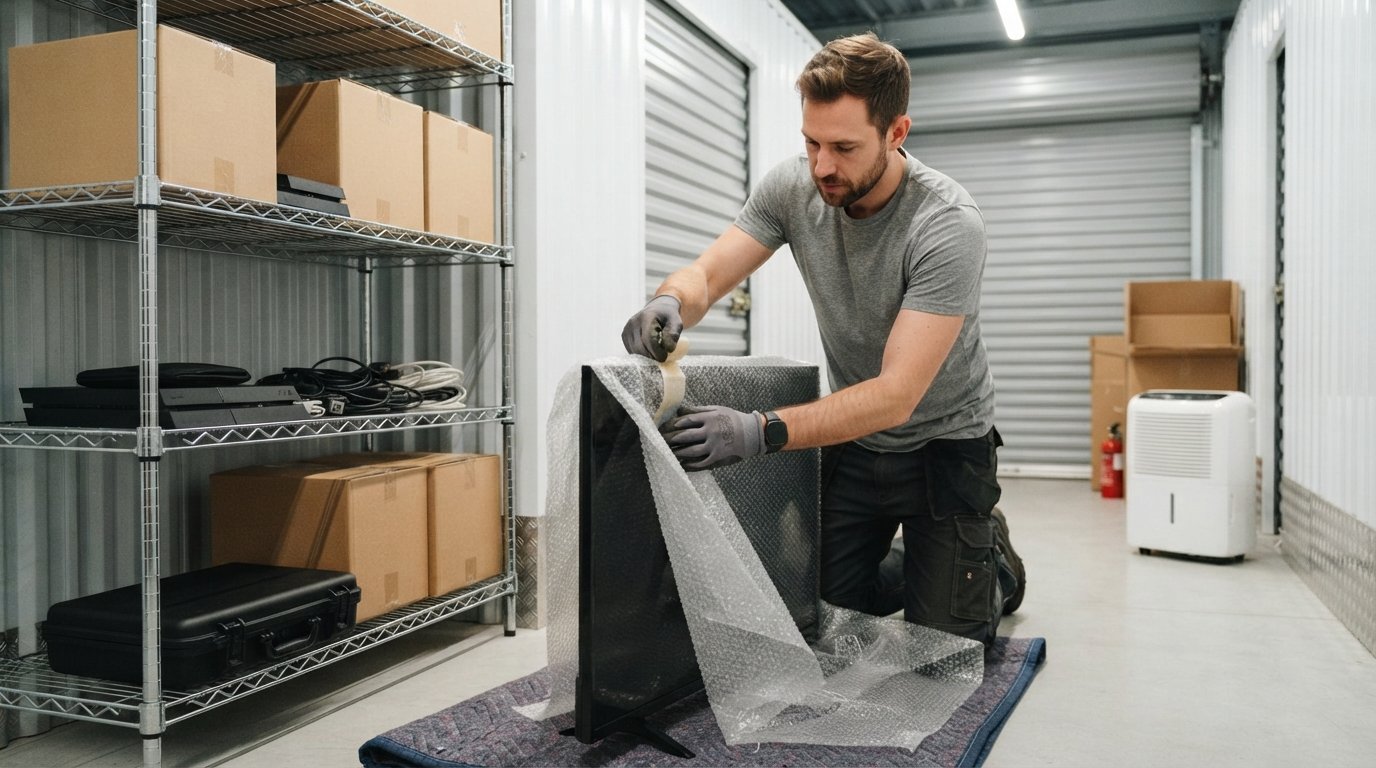
If you still have the original packaging, use it. Original boxes are designed to cradle the device and protect it from shock. If you do not have original boxes, invest in heavy-duty double-wall cardboard boxes and anti-static bubble wrap. Never use packing peanuts alone for heavy electronics; they shift during transport and leave gaps. For fragile screens, cut a piece of rigid foam board or corrugated plastic to fit over the display, then wrap the entire unit in anti-static bubble wrap. Secure the wrap with painter's tape, not duct tape, which leaves sticky residue.
Consider whether some items should not go into storage at all. Extreme temperatures can destroy lithium-ion batteries, ruin LCD screens, and warp plastic casings. If your storage unit is not climate controlled, think twice about storing high-end laptops, large TVs, or musical electronics. For these items, a climate-controlled unit is worth the extra cost. The same logic applies to antique electronics or vintage audio gear, which may have components that degrade faster.
Choose the Right Storage Unit
Not all storage units are equal. The three main factors are climate control, security, and accessibility. Climate-controlled units maintain a stable temperature, usually between 55 and 85 degrees Fahrenheit, and keep humidity below fifty percent. This prevents condensation, mold, and corrosion. Non-climate-controlled units are cheaper but expose your electronics to seasonal extremes. If you live in an area with harsh summers or freezing winters, climate control is non-negotiable for electronics.
Security matters too. Look for a facility with gated access, individual unit alarms, surveillance cameras, and on-site staff. A unit on an upper floor is less vulnerable to flooding than a ground-floor unit. Ask about pest control. Rodents chew through wires and nest in warm electronics. A clean, well-maintained facility will have a pest management plan in place.
Accessibility affects how you pack. If you need to retrieve items periodically, choose a unit with easy drive-up access or wide hallways. If you are storing long-term and will not visit often, a smaller interior unit is fine. Measure your largest item, such as a TV or desktop tower, and confirm the unit door is wide enough. Also ask about insurance. Most storage facilities require you to carry your own insurance or purchase a policy from them. Check whether your homeowner's or renter's insurance covers items in storage; many policies do, but with limits.
Packing Electronics for Storage
Packing is where most damage happens. Follow a consistent method for every device. First, wrap the item in anti-static bubble wrap. Static electricity can fry sensitive components, so avoid regular bubble wrap or newspaper, which can generate static and leave ink smudges. For flat screens, place the wrapped TV into a sturdy box that allows at least two inches of padding on all sides. Fill gaps with crumpled packing paper or foam noodles. Do not lay a TV flat if you can avoid it; vertical storage reduces pressure on the screen.
For computers and gaming consoles, remove any discs or cartridges. Wrap the tower or console separately from the monitor. Use foam inserts or custom-cut cardboard to immobilize the device inside the box. Label the box with the device name and "FRAGILE: ELECTRONICS." For smaller items like routers, external hard drives, and webcams, group them by function. Place each in its own anti-static bag, then pack them together in a small box with padding. Keep all cables in a separate labeled bag so you do not have to untangle them later.
Here is a quick checklist for packing any electronic device:
- Back up data and remove batteries or discs.
- Clean the device and let it dry completely.
- Wrap in anti-static bubble wrap and secure with painter's tape.
- Place in a double-wall box with two inches of padding on all sides.
- Label the box with contents and handling instructions.
After packing, seal boxes with heavy-duty packing tape. Do not use masking tape or duct tape, which dry out and lose adhesion. Write the contents on the outside of each box, and add a number so you can track them. If you are hiring professional packers, confirm they use anti-static materials and are trained in electronics handling. Many full-service moving companies offer packing services that include electronics-specific care. You can request quotes for packing and storage services through platforms that connect you with vetted professionals.
Arranging Your Storage Unit
How you arrange items inside the unit affects both accessibility and protection. Start by placing a plastic pallet or wooden pallet on the floor. Never set boxes directly on concrete, which wicks moisture and can lead to mold. Stack boxes in a way that heavier items are on the bottom and lighter items on top. Do not stack boxes more than three high if they contain fragile electronics. Leave a walkway down the center so you can access items without moving everything.
Keep electronics away from the door, where temperature fluctuations are greatest. Place them toward the back or middle of the unit. If you have a climate-controlled unit, avoid blocking vents or air circulation paths. Do not place electronics near chemicals, paints, or solvents. Vapors can corrode metal contacts and degrade plastic. Also, keep electronics off the floor in case of minor flooding or pest activity.
Consider using shelving units to get items off the ground and make better use of vertical space. Metal shelving is best because it does not absorb moisture. If you stack boxes, place the heaviest and most durable items at the bottom. Put a moisture absorber, such as silica gel packets or a dehumidifier, inside the unit. Replace silica gel every few months if you have access. For long-term storage, visit your unit periodically to check for signs of moisture, pests, or shifting boxes. A quick inspection can catch problems before they become expensive.
If you are storing a large number of electronics, create an inventory list. Note each item, its box number, and its condition. This helps with insurance claims and makes retrieval easier. Keep a copy of the inventory outside the unit, such as in your email or a cloud drive. You can also use a free quote request service to find professional storage and moving help if you need assistance transporting items to the unit.
Long-Term Storage Tips and Maintenance
Electronics can survive months or even years in storage if you follow a few maintenance rules. First, control humidity. If your unit is not climate controlled, use rechargeable dehumidifiers or moisture-absorbing packets. Check them monthly and recharge or replace as needed. Second, control temperature. Avoid units that get direct sunlight or are near exterior walls that heat up. Third, protect against pests. Use sealed plastic bins instead of cardboard for smaller electronics. Cardboard attracts insects and rodents. Plastic bins also keep out dust and moisture.
Fourth, think about power. Do not leave devices plugged in. Even in sleep mode, electronics can draw power and generate heat. Unplug everything and coil cords loosely. Fifth, consider removing the internal battery from laptops and cameras if possible. Batteries are the most common failure point in stored electronics. If you cannot remove the battery, store the device in a cool, dry place and check it periodically.
Finally, plan for the day you retrieve your items. Before you plug anything in, let it acclimate to room temperature for at least twenty-four hours. Condensation can form inside a cold device when you bring it into a warm room. Plugging it in immediately can cause a short circuit. Inspect for cracks, corrosion, or pest damage. If something does not power on, do not force it. Consult a repair professional.
Storing electronics safely is not complicated, but it requires attention to detail. By preparing devices properly, choosing a climate-controlled unit, packing with anti-static materials, and arranging your unit wisely, you protect your investment. Whether you are moving across town or just clearing space, these steps will help you avoid the frustration of damaged gear. If you need help with packing, transportation, or finding a secure storage facility, consider reaching out to professionals who can handle the heavy lifting. You can also explore resources like FreeQuotes.Contractors for home improvement projects that might require temporary storage. With the right approach, your electronics will be ready to use when you are.